

.png?width=40&height=40&name=image%20(9).png)
If you’re responsible for your organisation’s security, you’ve probably asked yourself this question in the past year: Can Microsoft Defender really protect us at an enterprise level? The push to consolidate tools and reduce costs is real. Many companies are under pressure to simplify their security stack and “use what they’ve already got.” And with Defender included in many Microsoft 365 licences, it feels like an easy win.
But here’s the catch: “free” doesn’t always mean “fit-for-purpose.” Over the last few years, Microsoft has transformed Defender from a basic antivirus into a legitimate enterprise platform. It now spans endpoints, identities, email, and cloud workloads. The challenge is understanding where that power stops, and the security gaps it doesn’t fill.
As an Account Manager at Babble, I’ve worked with dozens of businesses that have tried to go “all in” on Microsoft security. Some have succeeded brilliantly, while others have learned expensive lessons about where third-party tools are needed.
In this review, I’ll share exactly where Microsoft Defender performs, where it falls short, and how to know whether it’s enough for your organisation — or whether you need to build on top of it.
–
What This blog Covers:
- Is Microsoft Defender “Good Enough” for Enterprise Security?
- What Microsoft Defender Does Exceptionally Well
- The Areas Where Defender Needs Backup
- The Consolidation Debate: Efficiency vs. Risk
- Looking Ahead: How Defender Is Evolving Over the Next 12-24 Months
Is Microsoft Defender “Good Enough” for Enterprise Security?
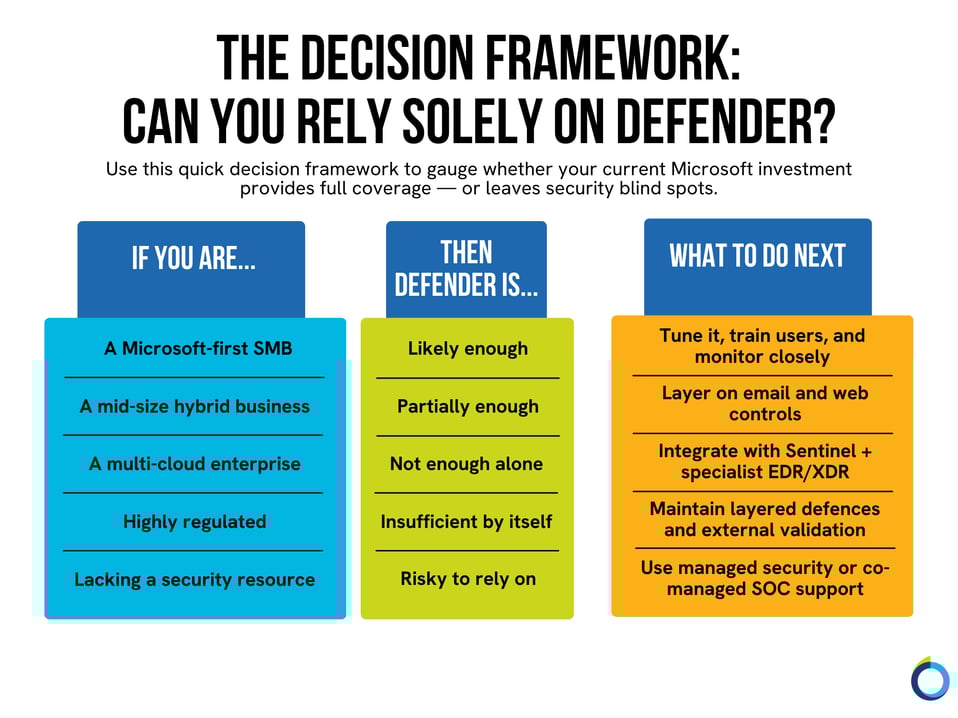
Firstly, “good enough” isn’t universal. However, the short answer is yes, but only if you’re in the right environment. If your business runs primarily on Microsoft technologies, such as Windows, Entra ID (formerly Azure AD), Intune, 365, and Azure, Defender can absolutely deliver enterprise-grade protection. But if your world is more complex — hybrid clouds, mixed devices, or external integrations — it’s a different story.
Microsoft has invested heavily in making Defender smarter, faster, and more tightly integrated, but it still leans on its own ecosystem. If you’re largely operating outside the Microsoft environment, you’ll start seeing the gaps. In other words, Defender is a good product, but it becomes great only when the environment around it is right.
What Microsoft Defender Does Exceptionally Well
1. Deep integration across the Microsoft stack
This is where Defender really earns its stripes. It seamlessly ties into the wider Microsoft ecosystem — Entra ID for identity, Intune for endpoint management, Sentinel for XDR and SIEM, and 365 for email and collaboration security.
The beauty of this is visibility. When it’s properly integrated, Defender can give you a single pane of glass to look through. You can trace an incident end-to-end: from a suspicious login, to a malicious attachment, to a compromised device — all in one console.
2. Automation and response
Defender’s automated investigation and remediation (AIR) is one of the most impressive aspects of the suite. Once tuned, it can automatically isolate devices, roll back malicious changes, and remove threats (often before an analyst even logs in). I’ve seen customers cut their incident response times in half by properly configuring automation policies.
3. Value and consolidation
For many, Defender’s biggest advantage is the cost efficiency. If you’re already on an E5 licence, you’re essentially sitting on a comprehensive security suite you might not even be using to its full potential.
I worked with one organisation that retired three overlapping tools by consolidating onto Defender, Intune, and Sentinel. This saved 30% in licensing costs while improving mean-time-to-respond by 40%.
4. Continuous evolution
As mentioned earlier, Microsoft is constantly expanding Defender’s capabilities. The roadmap is aggressive, and updates roll out faster than most security vendors can match. For businesses that commit to staying current, the platform keeps getting stronger.
What “Good” Looks Like with Microsoft Defender
When Defender is deployed well, it’s impressive. But that success comes down to people, process, and discipline.
Here’s what a strong Microsoft Defender environment looks like in practice:
- Identity-first approach: Conditional Access, multi-factor authentication (MFA), and device compliance policies consistently enforced through Entra ID.
- Endpoint management: All devices enrolled in Intune with compliance baselines applied.
- Configuration hardening: Policies reviewed quarterly, automation tested, false positives minimised.
- Integrated incident response: Defender alerts feeding into Sentinel with clear playbooks.
- Complementary controls: A dedicated email gateway, DNS/web filtering, and third-party MFA or Privileged Access Management (PAM) for high-risk roles.
When used this way, Defender can match the performance of many standalone enterprise EDR or XDR solutions, but it demands ongoing attention.
The Areas Where Defender Needs Backup
1. Visibility outside Microsoft’s ecosystem
 Defender’s reach starts to thin the moment you move into non-Windows, unmanaged, or multi-cloud environments. If you’re running AWS, GCP, or large macOS/iOS fleets, Defender can technically plug in, but the telemetry isn’t on par yet. Alerts can feel inconsistent, and you lose the seamless context you get within Microsoft’s own ecosystem.
2. Email protection
Defender for Office 365 is improving fast, but tools like Mimecast or Proofpoint still outperform it in specific areas like behavioural analysis, targeted threat detection, and impersonation attempts. If your business deals with a high volume of external communication or financial transactions, I still recommend keeping a dedicated secure email gateway in place.
3. iOS and macOS support
Defender for iOS and macOS exists, but it’s not frictionless. Management is more complex, and enforcement isn’t as tight as on Windows. This is crucial to consider in executive environments or Bring Your Own Device (BYOD) setups.
4. Operational maturity required
Defender is powerful, but it’s not effortless. In other words, it isn’t “set and forget.” Out of the box, it can be quite noisy. Without someone to tune alerts, configure automation rules, and maintain compliance baselines, it can quickly overwhelm a small IT team.
When Defender Isn’t Enough on Its Own
There are clear scenarios where you’ll want to augment Defender with specialist tools:
- Multi-cloud workloads (AWS, GCP, Azure) where you need consistent telemetry.
- Large non-Windows fleets, particularly macOS or Linux-heavy environments.
- High compliance sectors — financial services, healthcare, defence — where layered protection is mandatory.
- High-volume phishing or targeted attacks where a specialist email gateway still adds value.
- Limited SecOps resource — smaller teams often struggle to manage the noise without external help.
In these cases, Defender becomes your foundation, not your entire security posture.
The Consolidation Debate: Efficiency vs. Risk
 There’s a real temptation to consolidate everything into Microsoft. The idea is that doing so simplifies procurement, reduces vendors, and can make audits easier. But consolidation doesn’t automatically equal simplification. If you’ve got multiple clouds, diverse endpoints, or industry regulations to meet, going “all in” on Microsoft may create blind spots instead of closing them.
If you’re a small business with about five users, Microsoft could probably take care of most needs. But if you’re managing 50 employees and each has a laptop and a phone, that’s around 100 devices that need protection. At that scale, I usually recommend multiple layers over the base. It depends on the industry you’re in and company size.
Put differently, consolidation can be a big win for Microsoft-first SMBs. But for complex, hybrid enterprises, it’s often a starting point, not the full picture.
Looking Ahead: How Defender Is Evolving Over the Next 12-24 Months
 Threats change by the minute, and Microsoft is adapting by rapidly expanding Defender’s capabilities — especially around multi-cloud and non-Windows integration. In the next year or two, you can expect deeper telemetry for AWS and GCP, more unified dashboards in Sentinel, and improved behavioural analysis.
If you’re heavily invested in the Microsoft ecosystem, the next two to five years will likely make Defender even more compelling. But remember: roadmaps don’t equate to readiness. Don’t build your security strategy around features that haven’t landed yet.
So, Is Defender Enough for You?
If you’re a Microsoft-first organisation with strong governance and a well-trained IT team, Defender can absolutely deliver enterprise-level protection.
But for hybrid, complex, or highly regulated environments, assuming Defender covers everything is risky. Don’t get me wrong, it’s strong, but it’s not universal.
I help businesses cut through the noise around Microsoft Security and turn licences into real-world resilience. I’m not here to sell you tools, but to help you make the most of what you already have.
If you’re not sure how far Defender can go for your organisation, get in touch with us. We’ll benchmark your setup, find the gaps, and show you how to get the most from your investment. You’ll walk away knowing whether Defender can stand alone or works best as part of a layered approach in your environment.
.png?width=170&height=170&name=image%20(9).png)


Microsoft 365 E3 vs E5: Which Licence Is Worth the Extra Cost?


Microsoft Teams vs. CCaaS: Which Is Better for Customer Service?
.png?width=40&height=40&name=Jordan%20Howe%20(1).png)

How Acronis Fills in the Backup Gaps
